







Choosing the Right Splice Mode on Your Fusion Splicer

A fusion splicer does not use one fixed setting for every fibre. Each fusion splicer splice mode, sometimes called a splice programme, sets the arc power, arc times, gap and other parameters the splicer uses. Choosing the right one is one of the simplest ways to get low, consistent splice loss.
This guide explains the main splice modes on INNO fusion splicers, when to use each one and how to change the mode in a few seconds.
The main splice modes
Auto mode
In Auto mode the splicer identifies the fibre type, such as single-mode (SM), multimode (MM) or dispersion-shifted (DS), and adjusts the arc power and timings to suit. It is the quickest and simplest option.
- ideal for technicians who are new to splicing
- suited to high-volume work where speed matters
- reliable under standard conditions with common fibre types
Manual mode
Manual mode gives you full control over the splicing parameters, including arc intensity, arc time and alignment settings.
- specialist installations that need non-standard settings
- repair work and checking splicer performance
- unusual fibre types or test set-ups
Single-mode (SM) mode
This programme is optimised for single-mode fibre, which has a small core of around 9 microns. It is the mode most UK telecoms work relies on, from backbone routes to FTTP drops.
- long-distance and backbone networks
- access and FTTP networks
- any link where low loss is critical
Multimode (MM) mode
Multimode fibre has a much larger core, typically 50 or 62.5 microns, and needs different arc settings to splice well.
- local area networks inside buildings and campuses
- data centres and other short-reach links
Quick guide to choosing a mode
| Your work | Suggested mode |
|---|---|
| FTTP and access networks with standard single-mode fibre | Auto or SM |
| Backbone and feeder cables | SM, or a programme matched to the exact fibre |
| Data centre and building LAN | MM |
| Unknown or special fibre, repairs, tests | Manual or a custom programme |
How to change the splice mode on an INNO splicer
Step 1. Check the active mode
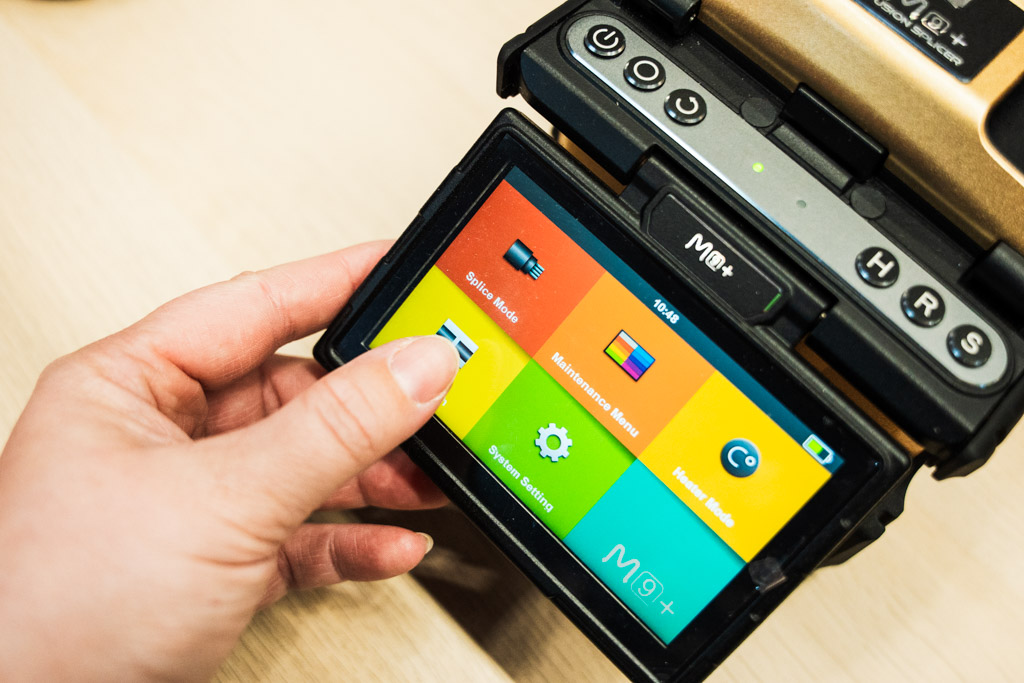
The current splice mode is always shown on the left side of the screen, so you can confirm it before you start.
Step 2. Open the splice mode list
Select [Splice Mode] from the main menu. The splicer lists the available modes, including Auto, Manual, Single Mode and Multimode.
Step 3. Select the mode
Highlight the mode that matches your fibre, for example Single Mode for SM fibre or Multimode for MM fibre, and select it.
Step 4. Return to splicing
The selected mode now appears on screen. Press [Reset] to return to the main splicing screen and carry on.
Custom programmes for unusual fibre
Some jobs involve fibre with unusual coatings, diameters or specifications. In these cases you can adjust parameters such as arc current, test the result and save the settings as a custom programme. Once saved, the programme can be selected in seconds next time, which keeps results consistent across the team.
If you change parameters, change one at a time and make a test splice after each change. That way you know which setting made the difference.
Still seeing errors?
If the right mode is selected and splices still fail, the cause is usually preparation, electrodes or arc calibration. Our guide to fusion splicing problems covers the most common errors and how to fix them. When the problem is the splicer itself, our UK service and repair centre turns most repairs round in 3 working days.
Choosing a new splicer? Our guide to core alignment vs cladding alignment explains which type suits your work, and you can browse our fusion splicers, all held in UK stock. For advice on settings for a particular fibre, contact our technical team.
For standard single-mode fibre, Auto mode or the SM programme gives reliable results. Choose a specific programme when you work with bend-insensitive or other special fibres and want settings matched to that fibre.
In Auto mode the splicer identifies the fibre and sets the arc and timings itself. Manual mode lets you control each parameter, which is useful for unusual fibres, repair work and testing.
Splicing different fibre types together is not recommended for normal network links because the core sizes differ and loss will be high. If you need to do it for a specific application, contact our technical team for advice on settings.
Yes. INNO splicers let you adjust parameters such as arc current and save them as a custom programme for later use.