





Fibre Cleaver Guide: Cleave Quality, Blade Care and Common Faults

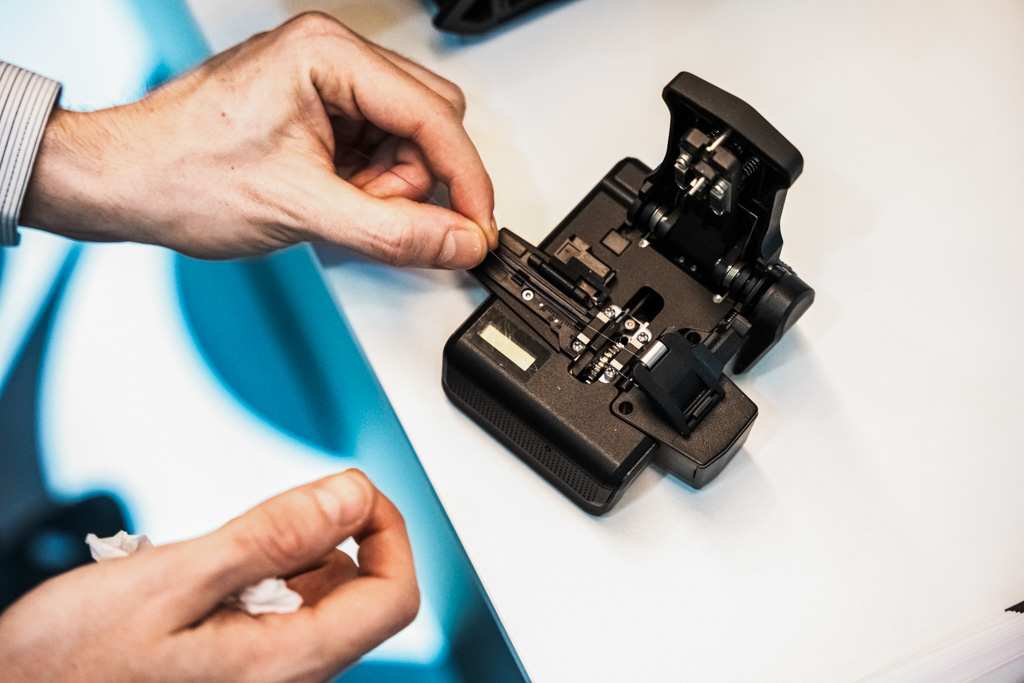
A fusion splice can only be as good as the fibre ends going into it. The fibre cleaver decides the shape and angle of those ends, which makes it one of the most important tools in the kit. When splice errors keep coming back, the cleaver is often where the problem started.
Why cleave quality matters
A good cleave gives a flat, clean end face at close to 90 degrees to the fibre axis. A poor cleave can leave an angle, a lip, a chip or a rough edge. When those ends are fused, the result is higher loss, bubbles or a weak splice. On site, dust, temperature, handling and workload all affect cleave quality, so it pays to check it regularly rather than assume it.
Reading cleave-related messages on your splicer
INNO fusion splicers check the fibre ends before splicing and tell you what kind of issue they have found. Messages such as right fiber core shape wrong, left fiber place error or fiber endface gap wrong point you to the part of the process that needs attention.
| Message type | Likely cause | What to check |
|---|---|---|
| End face or core shape wrong | Poor cleave | Blade position and blade height |
| Cleave angle too large | Worn blade or poor fibre placement in the cleaver | Blade position and fibre clamping |
| Fibre place error | Fibre not seated correctly | Fibre holder, V-groove cleanliness, stripping length |
| End face gap wrong | Cleave length or placement | Cleave length and fibre position |
This helps even less experienced technicians narrow down the cause quickly, instead of re-splicing by trial and error. For errors after the splice, such as bubbles or thin splices, see our guide to fusion splicing problems.
Signs of a worn blade
If cleave-related messages start to appear more often, look at the blade before anything else. Common causes are:
- the current blade position has reached the end of its life
- the blade height is set incorrectly
- dirt or glass fragments on the blade or clamp pads
If your splicer is connected to View Pro Manager, repeated cleave-related errors can trigger a notification that a blade change may be due. That lets you plan the change before it starts to affect splice loss.
How long a cleaver blade lasts
INNO cleaver blades are designed for long, predictable life. Each blade has 24 positions and gives up to 2,500 cleaves per position, which adds up to around 60,000 cleaves over the blade’s life. Rotating the blade spreads wear evenly across its edge, so the cleave angle stays consistent throughout.
Everyday cleaver care
- Keep the cleaver closed and in its case when not in use.
- Clean the clamp pads and blade area regularly with a soft brush or lint-free swab.
- Empty the fibre scrap collector often so broken fibre does not reach the blade.
- Rotate the blade to a new position as soon as cleave quality drops.
- Avoid dropping the cleaver, because a knock can change the blade height.
Replace the blade yourself or let us do it
When all positions are used, fit a new genuine blade such as the B-80 replacement blade. Genuine blades are made to the exact dimensions of the cleaver, which keeps cleave angles within specification.
Alternatively, send the cleaver to our UK service and repair centre. We fit a new blade and carry out a full calibration to factory specification, with a 3-working-day turnaround for customers in the UK and Ireland. If you are not sure whether the problem is the cleaver or the splicer, send a photo of the splicer screen to our support team and we will help you find the cause.
Cleavers and blades from UK stock
Uptero supplies INNO fibre cleavers, replacement blades and accessories from UK stock, with dispatch the same or next working day. New cleavers come with a 3-year warranty. If you fit splice-on connectors, a precision cleaver is essential for consistent results. For advice on the right cleaver for your splicer, contact our support team.
An INNO cleaver blade has 24 positions and gives up to 2,500 cleaves per position, which adds up to around 60,000 cleaves over its full life.
Repeated messages about the fibre end face, core shape or cleave angle, together with visible chips or lips on the fibre end, usually mean the blade position is worn or the blade height needs adjusting.
Most splicers accept cleave angles up to around 1 degree for standard single-mode work, and many users set a tighter limit for critical links. Your splicer measures the angle and warns you when it is outside the limit you set.
Yes. Our UK service centre can fit a new blade and carry out a full cleaver calibration to factory specification, with a 3-working-day turnaround.